
FieldFlow Workforce
Stop chasing applicants. Start moving candidates forward.
AI hiring software for hourly and operational teams.
Now being used in restaurant, hospitality, and commercial cleaning hiring workflows.
FieldFlow helps handle the repetitive work between opening a role and meeting the right candidates. Create the job, screen applicants, manage candidate communication, coordinate interviews, and keep every next step visible in one hiring workspace.
Your team sets the criteria and makes the hiring decisions. FieldFlow helps keep the work around those decisions moving.
Current user? Log in to manage roles and review candidates.
Need help accessing your account? Contact the Archlogix team.
Hiring breaks down after the application arrives.
Getting applicants is only the beginning.
Managers still have to determine who meets the basic requirements, who is worth a deeper conversation, who responded, who scheduled, who needs follow-up, and who has been ignored for too long.
That work often ends up spread across job boards, phone calls, personal text messages, calendars, notes, and memory. It becomes especially difficult when hiring is only one part of someone’s job.
FieldFlow gives the work between “someone applied” and “someone is ready to interview” one place to happen.
FieldFlow helps teams manage:
- Job creation and publishing
- Application criteria and scoring
- Qualitative AI phone screening
- Candidate text messages and follow-up
- Screening and interview scheduling
- Candidate stages and next steps
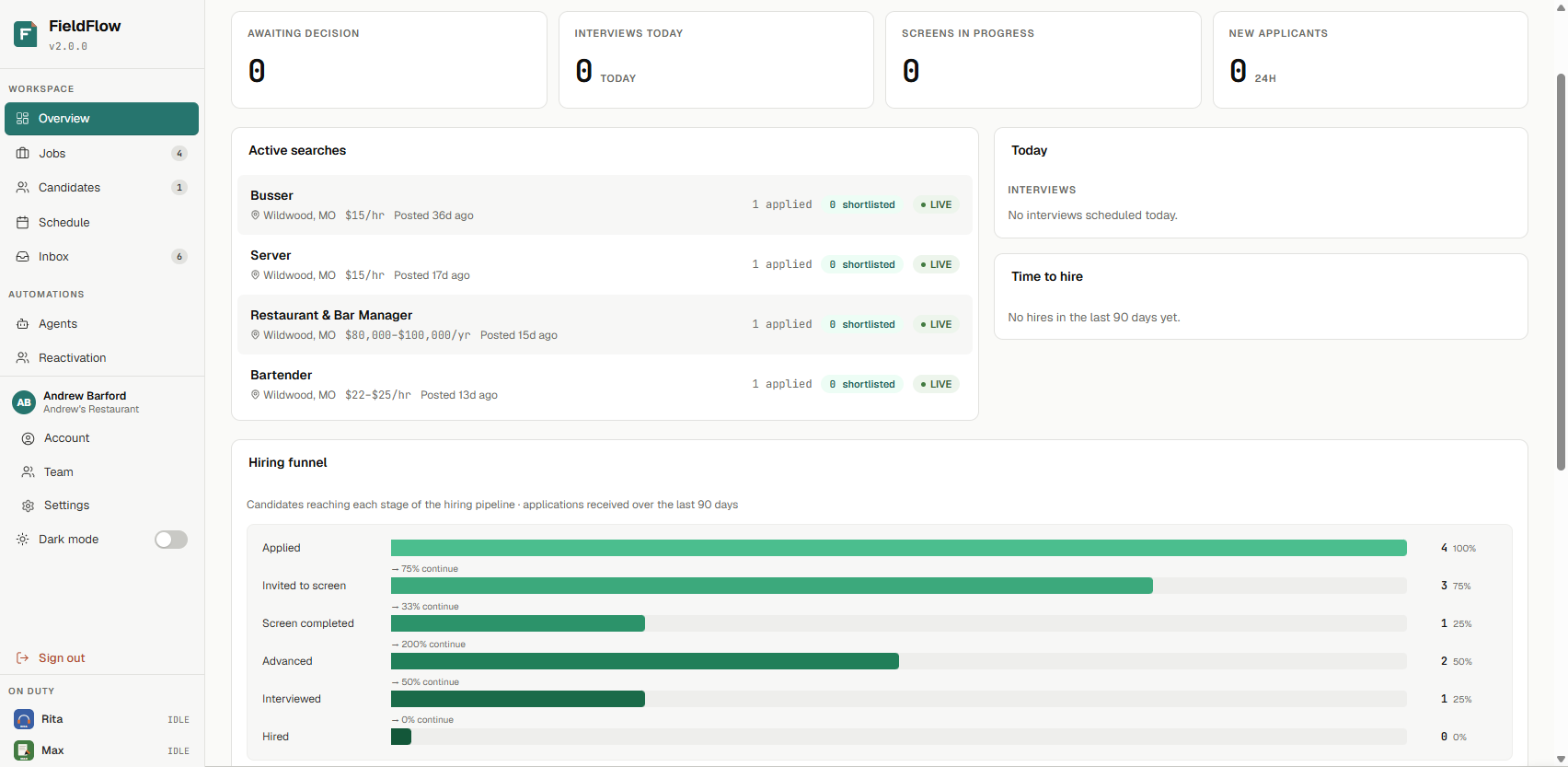
- Hiring activity and funnel visibility
- Re-engagement of previous candidates
Start with a stronger job setup.
Creating a job should not require starting from a blank document or copying an old posting that no longer fits.
Describe the role in plain language. FieldFlow uses industry-specific context, along with information already stored in your company profile, to create a more relevant starting point for the job. It can help generate:
- Job details and posting copy
- Application questions
- Phone-screen questions
- Candidate-facing FAQs
Choose which sections you want FieldFlow to generate. Then review, edit, remove, or add anything before the job is published. Company details such as location, benefits, working hours, branding, service area, and workplace information can also carry into the job setup and candidate experience.
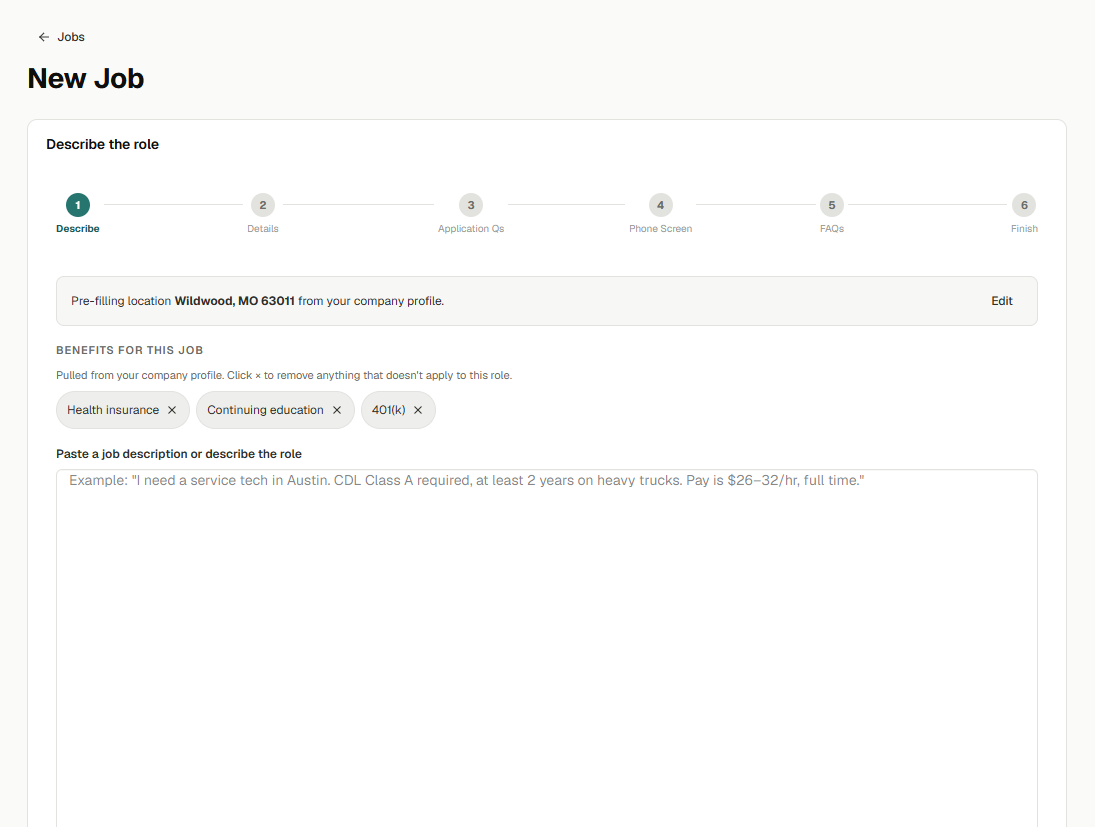
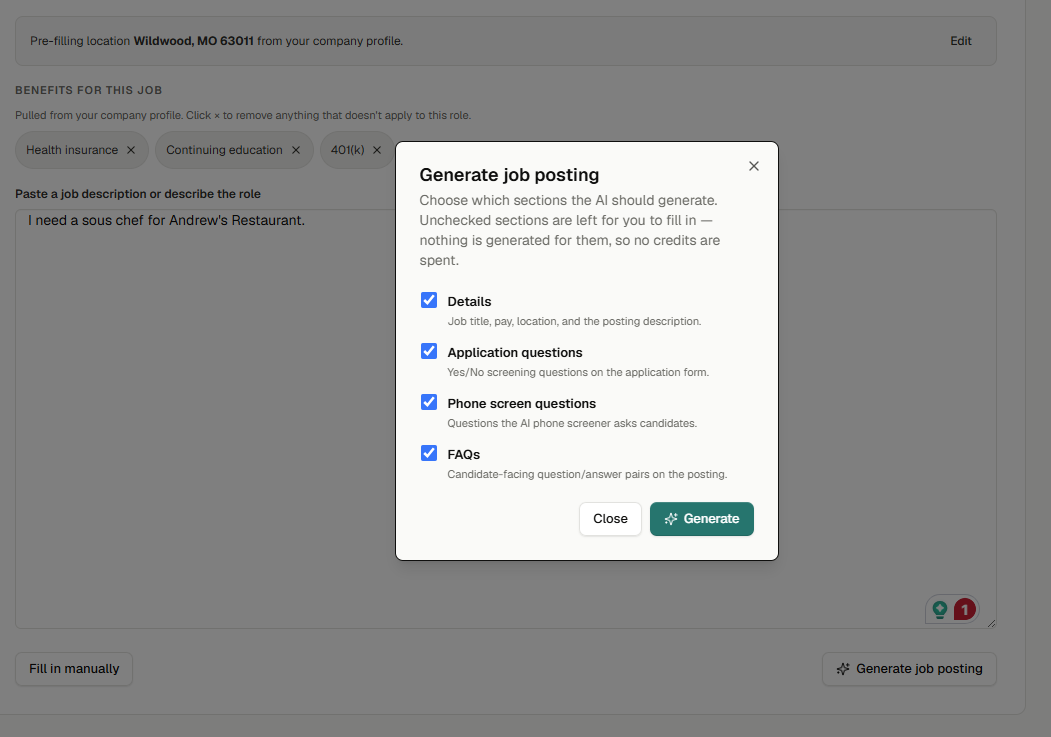

Managers spend less time assembling the mechanics of a new search and more time confirming what actually matters for the role. The process also starts with clearer requirements, which improves the quality of the screening work that follows.
Set the criteria before applications start piling up.
Different roles require different evidence.
A certification may be essential for one job. Schedule availability may matter more for another. Some requirements are non-negotiable, while others should contribute to an overall view of the candidate.
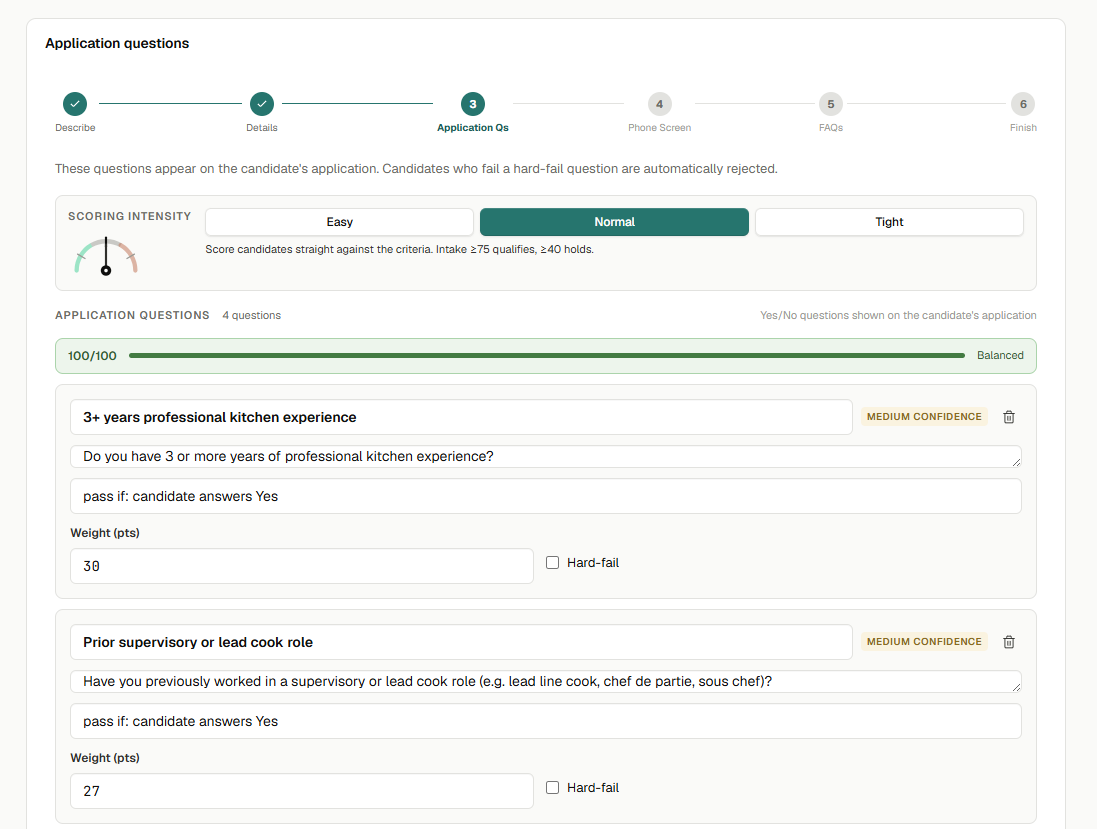
FieldFlow lets the hiring team define:
- Role-specific application questions
- Weighted screening criteria
- Required or must-have qualifications
- Scoring intensity
- The criteria the AI phone screener should explore in more depth
The team determines what matters. FieldFlow applies those criteria consistently as applications arrive.
Managers do not have to reconstruct the requirements every time they open an application. They get a more consistent first review and a clearer reason for why an applicant received a particular result.
Get more than yes-or-no answers from the phone screen.
Basic application questions can confirm requirements. They cannot always tell you how someone communicates, thinks through a situation, or describes their experience.
FieldFlow’s AI phone screener asks open-ended, role-specific questions. Each question can include a scoring rubric that describes what a weak, acceptable, or strong answer should contain. This is qualitative screening, not simply a sequence of yes-or-no gates.
After the conversation, managers can review:
- The candidate’s response
- A question-level score
- The reasoning behind the score
- A written summary of the candidate
- Intake and phone-screen results separately
- Areas that deserve a closer look during the interview
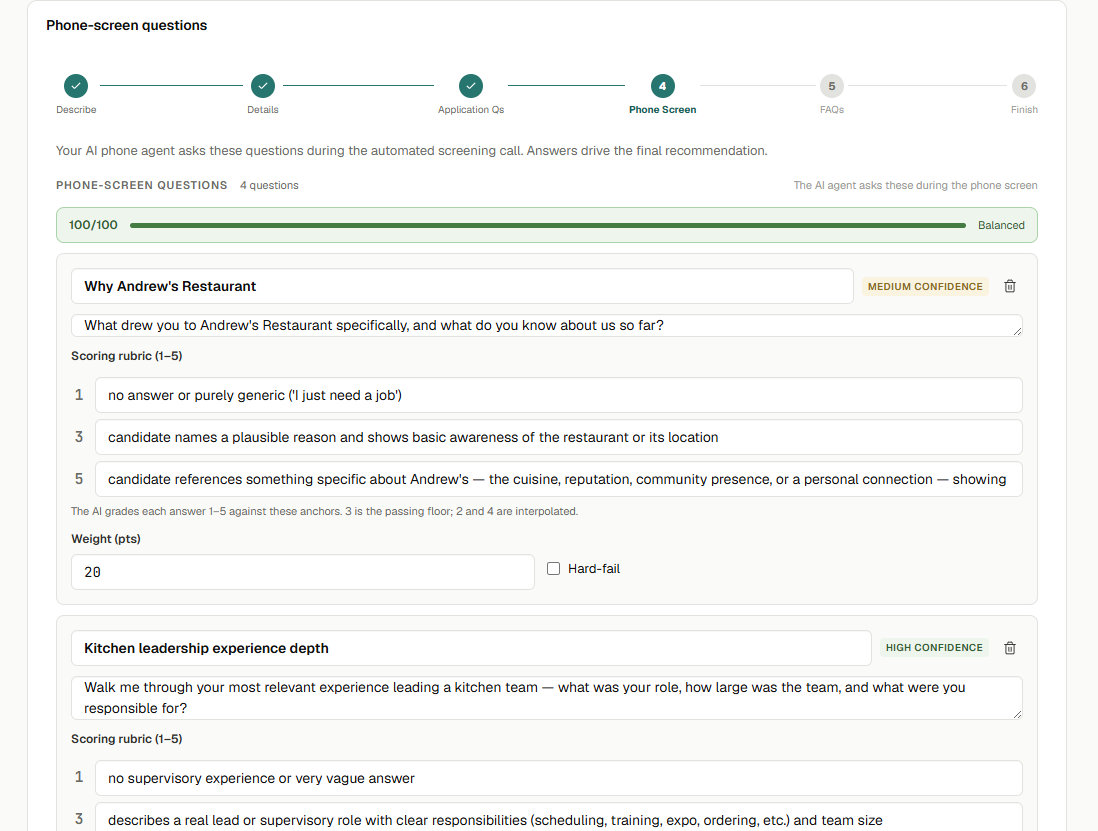
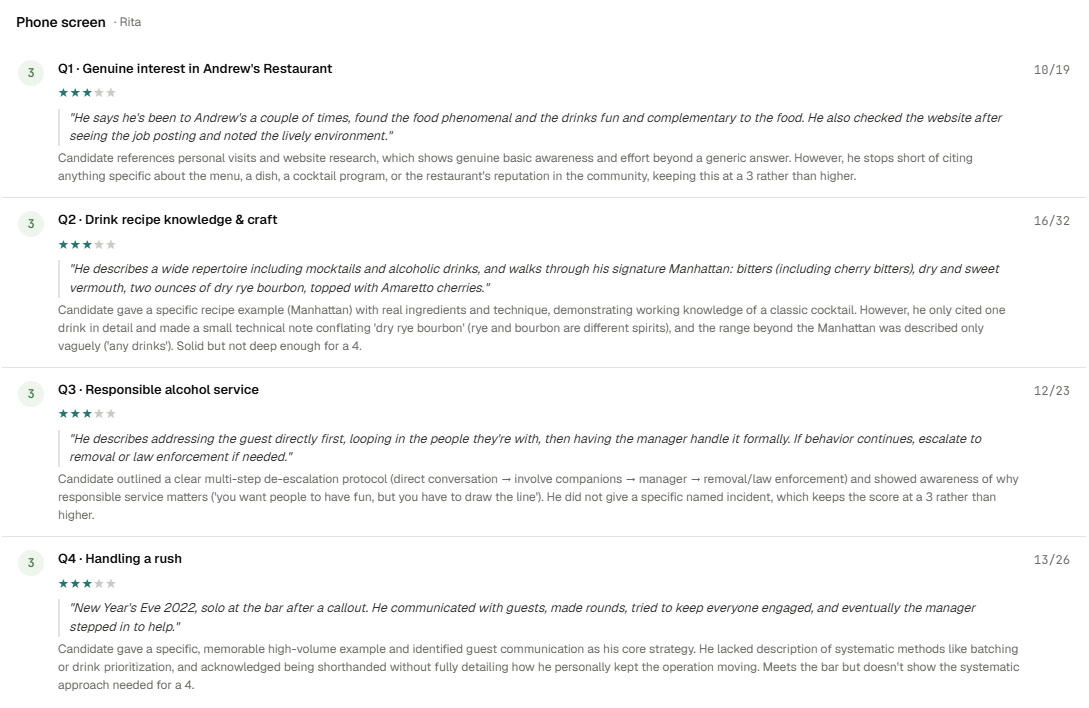
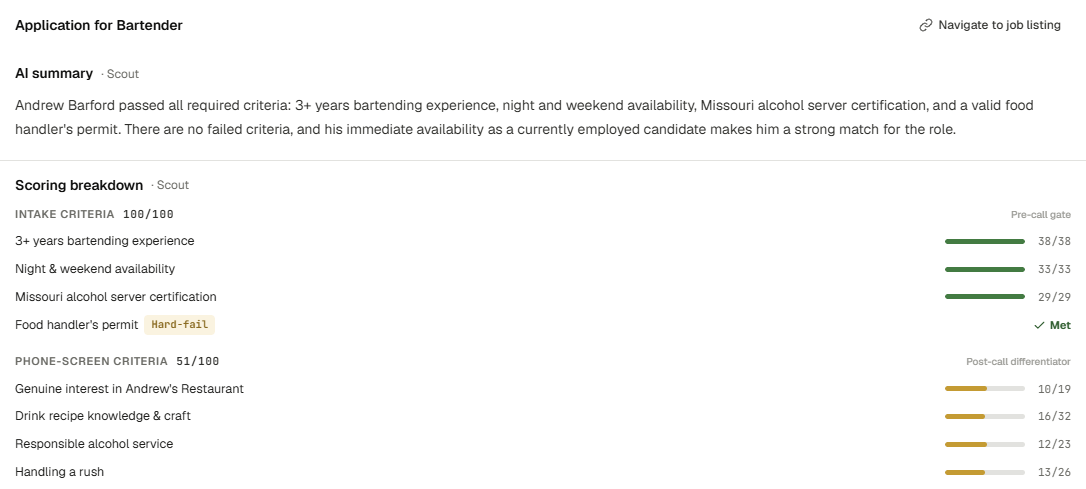
Managers can begin the interview with more context. They can see how the candidate answered, where the response was strong or incomplete, and which subjects deserve follow-up.
Let candidates screen when the timing works.
Catching an applicant at exactly the right moment is difficult. They may be working, driving, caring for someone, or unable to complete a screening conversation when the call first arrives.
When FieldFlow’s phone agent reaches a candidate, the candidate can complete the screen then or schedule it for a better time.
The screening workflow can also support English- and Spanish-language conversations and follow the calling windows and retry limits configured by the employer.
The process does not depend on a manager and a candidate repeatedly missing each other. Candidates have a clearer way to complete the next step, while managers do not have to personally coordinate every screening call.
Keep candidate communication inside the hiring workflow.
With FieldFlow, the hiring team can send text messages directly from the product or let an AI messaging agent handle defined follow-up tasks.
The hiring inbox brings together events that need attention, including:
- Candidate replies and updates
- Screening activity
- Interview bookings
- Other workflow updates
Text-delivery status and candidate opt-out requests are also visible in the system.
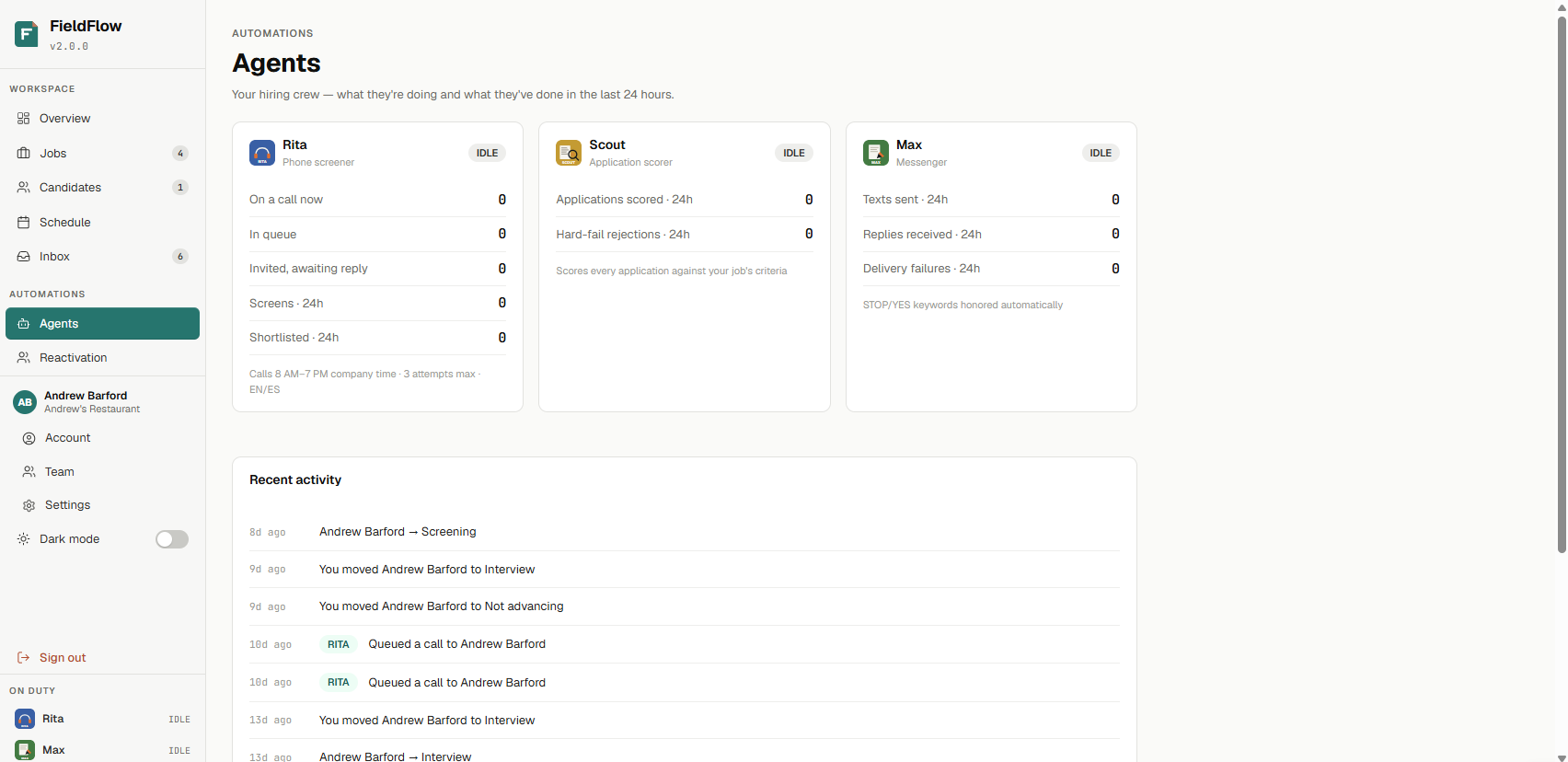
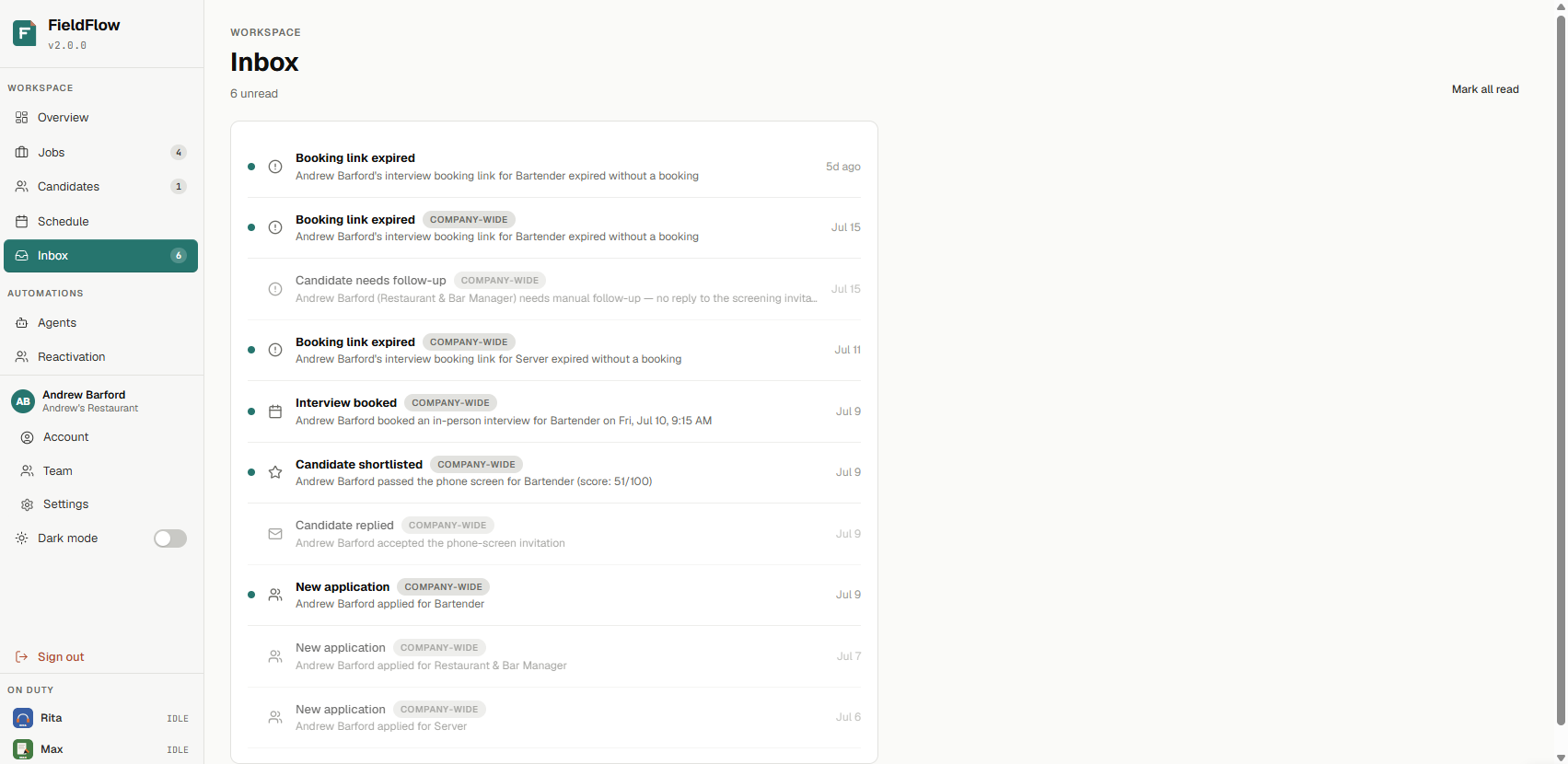
The hiring record does not disappear into individual phones and separate message threads. Managers can see what happened, what still needs attention, and where a person may need to step in.
Meet the FieldFlow hiring agents.
Each agent has a defined job inside the workflow.
Managers can review the agents’ activity, see what has been completed, and take over when human attention is needed.
Scout reviews applications.
Scout evaluates application information against the role’s configured criteria and creates a first-pass analysis.
Rita handles phone screens.
Rita asks the qualitative screening questions created for the job, records the candidate’s responses, and evaluates them against the role requirements.
Max keeps communication moving.
Max supports candidate text messages, replies, reminders, and follow-up activity.
For some roles, the resume is not enough.
Some roles are hard to judge from an application alone. A server may look good on paper, but you still need to understand how they communicate. A line cook may have the right experience, but you may want to see how they move, listen, stay organized, and handle pressure.
When your hiring process includes interviews, trial shifts, working interviews, or practical evaluations, FieldFlow can help bring more structure to what happens next.
Managers and team leads can collect feedback using consistent criteria, so the decision is not based only on memory, scattered notes, or one person’s gut feel.
Compliance note: Trial shifts, working interviews, and practical evaluations should follow your company’s hiring policies and applicable labor requirements.
How trial shifts can work
- Select candidates from your shortlist.
Choose the applicants you want to evaluate and add the details for the interview, trial shift, or practical evaluation. - Collect feedback from the people who saw the work.
A manager, shift lead, chef, or senior team member can share feedback through a simple evaluation link. - Compare candidates with more structure.
FieldFlow organizes feedback so managers can compare candidates using consistent criteria rather than relying on memory, scattered notes, or gut feel alone. - Move forward with a clearer record.
You still make the final decision. FieldFlow gives you a clearer view of what happened before you make it.
Frequently asked questions
What is FieldFlow Workforce?
FieldFlow Workforce is an AI-based applicant-tracking system built for restaurants and other hourly-workforce businesses. It helps owners and managers organize applicants, support early screening, reduce manual follow-up, and move qualified candidates toward interviews, trial shifts, or the next step in the hiring process.
Is FieldFlow only for restaurants?
No. FieldFlow can support many hourly hiring workflows. Restaurants are the first focus because hiring often happens while managers are also running shifts, covering gaps, helping guests, and keeping the schedule moving.
How can FieldFlow help with restaurant hiring?
FieldFlow helps bring more structure to the early hiring process. It can help organize applicant information, screen against the criteria you set, support follow-up, and create plain-English candidate summaries so managers have a clearer starting point.
What should restaurant hiring software help with?
Restaurant hiring software should help managers organize applicants, review key information, support screening, manage follow-up, and keep candidates moving toward interviews or trial shifts. FieldFlow focuses on the early hiring steps that often get scattered when managers are also running shifts and covering the schedule.
Does FieldFlow make hiring decisions?
No. FieldFlow supports hiring decisions while keeping your team in control. Managers decide who moves forward, who gets interviewed, who is invited to a trial shift, and who is hired.
Can FieldFlow help with applicants from social media job posts?
Yes. FieldFlow is currently being tested with restaurants using social media job postings. It helps teams bring more structure to applicant review, screening, and follow-up after candidates respond.
Can FieldFlow help with Indeed applicants?
FieldFlow is being prepared for testing with job postings on Indeed. The goal is to help restaurants manage applicants from job boards with the same structure: clearer candidate information, less manual follow-up, and a better path from application to the next step.
What kinds of restaurant roles can FieldFlow support?
FieldFlow can support hiring for roles such as servers, hosts, bartenders, line cooks, prep cooks, dishwashers, bussers, food runners, shift leads, assistant managers, and other hourly restaurant positions.
Can FieldFlow support trial shifts or practical evaluations?
Yes. When a restaurant uses trial shifts, working interviews, or practical evaluations, FieldFlow can help collect feedback from managers, shift leads, chefs, or senior team members using more consistent criteria.
Trial shifts, working interviews, and practical evaluations should follow your company’s hiring policies and applicable labor requirements.
How is FieldFlow different from a basic job posting tool?
A job posting helps attract applicants. FieldFlow helps with what happens after applicants respond. It gives restaurant teams a more organized way to review candidates, support screening, follow up, and decide who should move forward.
Do candidates apply directly through FieldFlow?
Candidates can apply through a role-specific intake page that collects the information your team needs to review. This gives managers a clearer view of applicant details rather than relying solely on scattered messages, resumes, or notes.
What does AI restaurant hiring software do?
AI restaurant hiring software can help organize and summarize applicant information against the criteria you set. FieldFlow uses AI to support the early review process, but it does not replace the hiring manager.
How do we try FieldFlow?
Bring a real restaurant role you need to fill. FieldFlow can help you test the workflow with your actual applicant process, including screening, follow-up, candidate summaries, interviews, and trial shift feedback.